
Podcasts have a lot of good information, funny moments, emotional narratives, and great thoughts. This can be very effective short-form content. But it is time-consuming to find and polish each segment manually. AI can automate repetitive editing and formatting tasks. Pippit’s tools can be used to convert media provided to create structured and engaging video content. This method enables creators to edit extended conversations into shorter clips without having to manually rebuild each video.
Why Podcast Highlights Need More Than Simple Video Trimming
Removing unwanted footage isn’t enough for a useful podcast highlight. It should provide a full idea and provide enough context for viewers. An AI video generator can aid in this process by organizing provided content into captivating visual sequences. Top-performing highlights typically include informative, surprising, emotional, humorous, or thought-provoking statements. The opening should grab interest without unnecessary introductions. The middle should keep the best explanation or story that the speaker gave. Captions also play a role since many watch short videos without audio. Subtitles that are easy to read allow viewers to follow the dialogue in various viewing situations. Vertical formatting can also make sense for platforms with a short-form content focus, where users are consuming content on the go. Pippit can assist in creating a more cohesive highlight workflow from these elements.
Preparing Podcast Material for AI-Powered Repurposing
Better source material will provide Pippit with better foundations to repurpose podcast material. Use clear podcast video footage and audio as much as possible. Good recordings ensure dialogue, facial expressions, and interaction between speakers are more easily captured. The use of supporting images or videos can reinforce the parts that rely on verbal explanations. Prior to generating anything, determine the main message of the selected conversation. A focused message avoids the “highlight” being a list of unconnected statements. Prompts should include a description of tone, pacing, visual style, captions, and audience. Write whether the clip is supposed to be educational, energetic, dramatic, conversational, or funny. Pippit has the capability to also work with reference media, which enables creators to stay visually relevant during the generation process. Model selection may be Dreamina Seedance 2.0 or Seedance 2.5 based on the workflow.

Steps to Create Podcast Highlight Clips Fast Using an AI Video Generator Platform
Step 1: Prepare your podcast clip
- Sign up for Pippit using your Google, TikTok, or Facebook account.
- Go to “More” on the left menu and click “Video generator”.
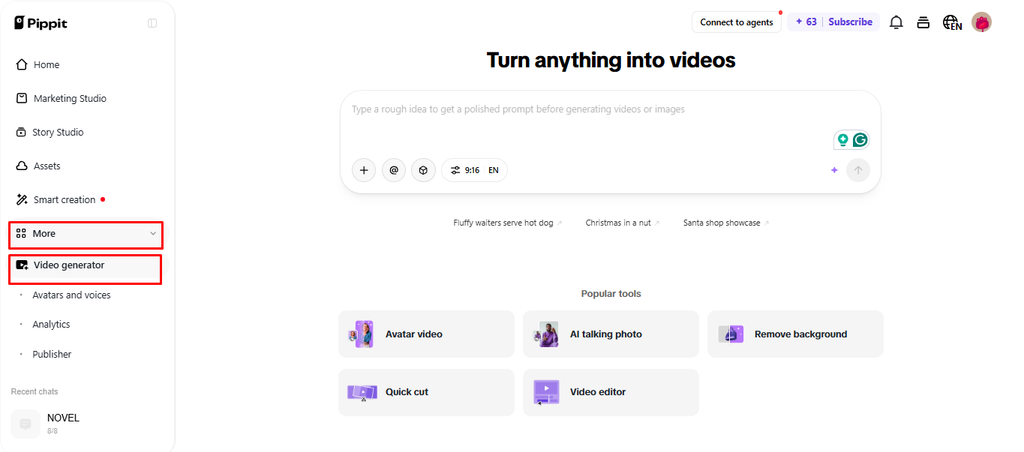
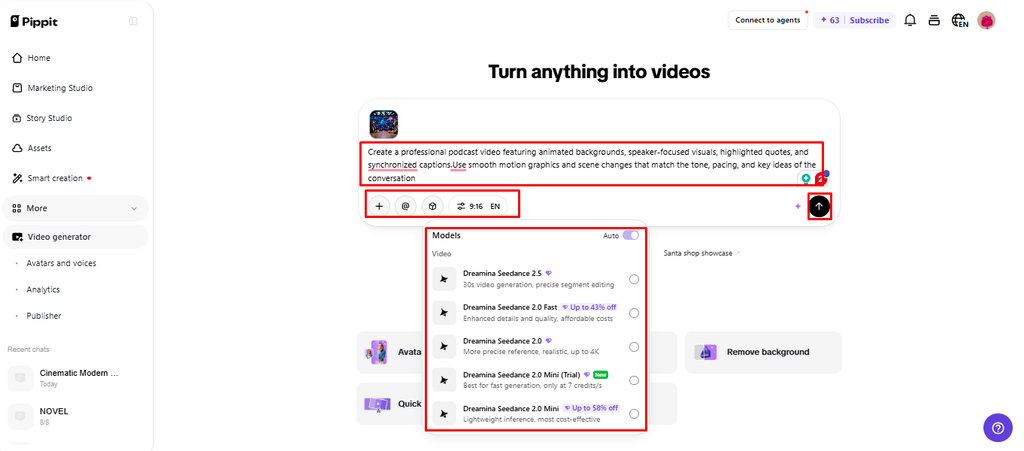
- Select an AI model, such as Dreamina Seedance 1.0, Dreamina Seedance 2.0, Dreamina Seedance 2.0 Fast, Dreamina Seedance 2.0 Mini, or Dreamina Seedance 2.5.
- Write a detailed prompt describing the podcast highlight you want.
- Choose the video length, language, subtitles, and aspect ratio.
- Click “+” to upload reference images or videos from your device, phone, Dropbox, or a link. You can also select available assets.
- Click “Generate” to begin.
Step 2: Generate the highlight
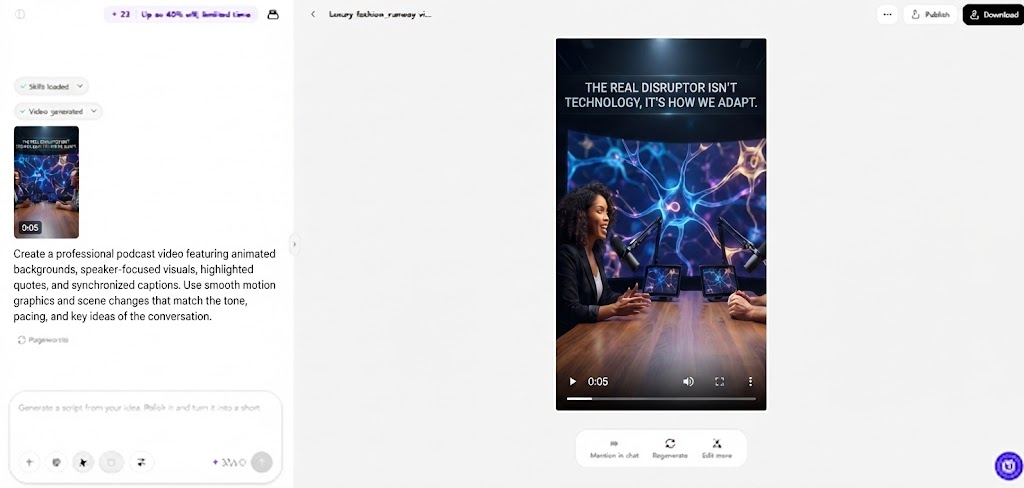
- After clicking “Generate,” Pippit’s AI video generator creates the video from your prompt and reference media.
- The AI handles transitions, pacing, captions, avatars, voice, lyrics, and visual enhancements.
- Review the video draft to check the generated podcast highlight.
Step 3: Polish and export
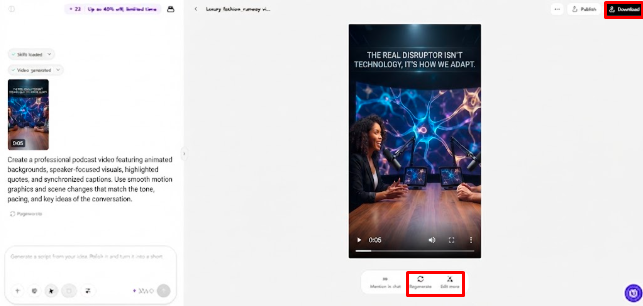
- Click “Download” at the top right to save it. Use “Regenerate” for another result, or click “Edit more” below the video for additional editing.
- Adjust captions, add text, and change size, color, alignment, filters, and effects.
- Add background music, remove backgrounds, and fine-tune the visuals.
- Click “Export” when finished.
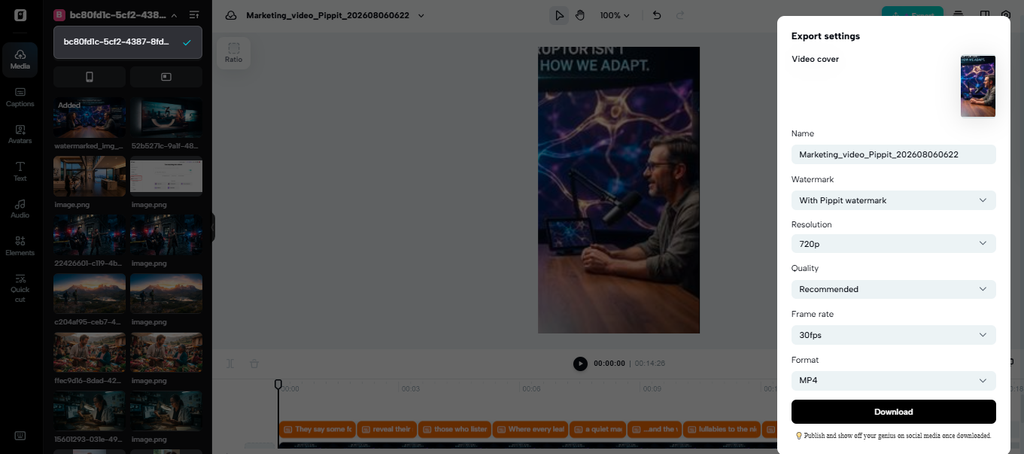
- Choose “Publish” for TikTok, Instagram, or Facebook, or select “Download” with your preferred format, resolution, frame rate, and quality.
Turning One Podcast Segment Into a Structured Highlight
A structured highlight should take viewers through one clear progression of a story. Use a hook that leads to the most attention-grabbing statement. Then give sufficient context to make the statement meaningful. Don’t make lengthy introductions that postpone the main idea. Keep the best thought, reasoning, explanation, or story from the discussion. Match visual changes with the speaker’s rhythm, instead of introducing movement for its own sake. Captions should be kept in sync with the spoken timing and be easy to scan. Visuals may be used if they aid in explaining an abstract or technical concept. End with a great ending, a question, a conclusion, or a natural conversational ending. Lastly, adjust framing/composition for the platform the clip will be displayed on. Pippit helps to bring these production elements together in one content workflow.
Using Captions and Visuals to Strengthen Spoken Content
When viewers are unable to listen to a podcast, captions can help them understand the highlights. These should be in sync with the voice and not obscure key facial features. Emphasize keywords to direct attention to names, claims, statistics, and memorable phrases. The hierarchy of text can also be used to distinguish between the main dialogue and secondary information. Pippit can add visual content to podcast footage when the material requires context. Sections may be enhanced with avatars, imagery, effects, and other enhancements, but not at the expense of the speaker’s message. The visual additions should not be the main point – the conversation should be the main point. Over-effects can take the attention away from the viewer and dilute the original message. Selected content can also be adapted for audiences using different languages, with the help of multilingual settings. Please carefully read translated captions as the language conversion may alter the meaning or terminology.
Making Multiple Clips From One Podcast Efficiently
Several topics and memorable exchanges can be included in one podcast. Rather than picking the same moments again and again, look for various themes in the episode. One segment could describe an idea and another a personal experience. A third might be funny, disagreeing, advising, or take a surprising viewpoint. Each clip should have a hook and maintain the meaning of the speaker. If multiple versions exist that need to be formatted in the same way, Pippit can help speed up production. Typography, caption placement, framing, and visual treatment that remain recognizable can help enhance series continuity.
- Educational clips: Highlight practical advice, explanations, definitions, or expert observations.
- Story clips: Select personal experiences with clear tension, development, and resolution.
- Opinion clips: Focus on strong viewpoints that encourage discussion without removing context.
- Humor clips: Preserve timing, reactions, and conversational setup around the punchline.
- Question clips: Build short segments around intriguing questions and compelling answers.
Editing and Exporting Podcast Clips for Distribution
Always look at the completed clip before posting it anywhere. Read and edit captions for spelling, timing, names, terms, and facts. Check framing to make sure speakers are always in view. Pay attention to distracting sounds like an audio change, abrupt cuts, or missing words. Regeneration is logical when the created structure is not directed towards the desired direction. Manual editing is useful if the idea is right and needs fine-tuning. Pippit’s editing interface allows you to fine-tune captions, text, effects, backgrounds, and visual presentation. Choose settings that are appropriate for the target export platform and desired quality prior to export. Resolution, frame rate, quality, and file format may impact the final viewing experience. Direct publishing options can simplify distribution to TikTok, Instagram, and Facebook. Nevertheless, each clip should have a final look at context before it’s published.
Conclusion
When repetitive production tasks become part of a structured production process, podcast repurposing is easier. AI can help accelerate visual generation, captioning, formatting, and creative variations. But it’s more important to make meaningful selections rather than shorten an episode. Highlights should convey full thought and retain necessary context. Pippit seamlessly integrates generation and post-production. This simplifies the creation of short and uniform clips from longer dialogues. Podcast highlight creation is a repeatable process for short-form content, if done carefully.